




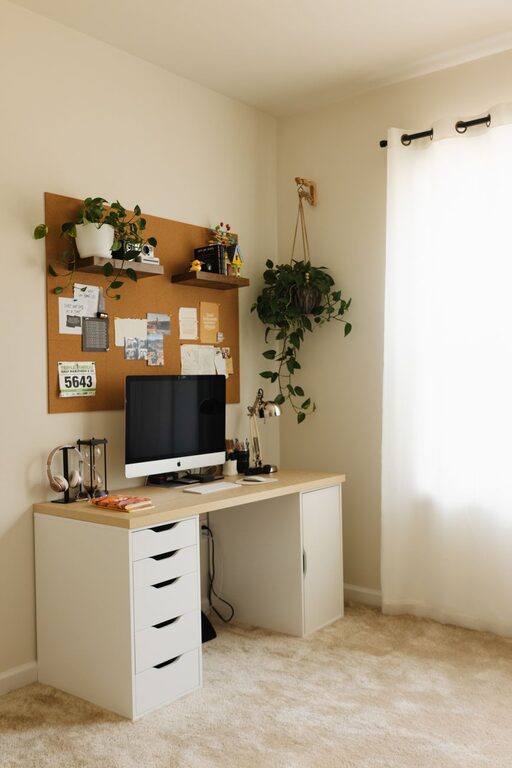

Tips for Creating a Relaxing Home Workspace to Boost Productivity
Creating a relaxing home workspace is essential for maintaining focus, reducing stress, and enhancing productivity—especially as more people work remotely. A well-designed workspace not only supports your daily tasks but also promotes a sense of calm and comfort. If you’re looking to improve your home office environment, here are practical tips to help you create a workspace that feels peaceful and inviting.
Why a Relaxing Workspace Matters
Before diving into the tips, it’s important to understand why a relaxing workspace makes a difference. A cluttered or uncomfortable environment can increase stress and distract you from your work. Conversely, a tidy, cozy area helps your mind stay clear and focused. The goal is to create a space that inspires creativity while minimizing distractions.
1. Choose the Right Location
Choosing the best spot in your home for your workspace sets the foundation for a peaceful environment.
– Find natural light: Position your desk near a window if possible. Natural light boosts mood and energy.
– Limit distractions: Avoid noisy or high-traffic areas of your home.
– Consider privacy: Pick a spot where you can concentrate without interruptions.
2. Prioritize Ergonomic Furniture
Comfort is key when you spend several hours at your desk each day.
– Invest in a supportive chair: Look for one with good lumbar support and adjustable height.
– Use a suitable desk: Ensure your desk height allows your elbows to rest at about a 90-degree angle.
– Add a footrest: This can improve your sitting posture and reduce strain on your legs.
3. Organize with Purpose
Keeping your workspace neat helps keep your mind clear.
– Declutter regularly: Remove items you don’t need daily.
– Use storage solutions: Drawers, shelves, and organizers keep supplies in order.
– Limit personal items: Add a few meaningful decorations, but avoid overcrowding.
4. Incorporate Calming Colors and Decor
Colors and decor can influence your mood and productivity.
– Choose soothing colors: Soft blues, greens, and neutrals create a calm atmosphere.
– Add greenery: Houseplants improve air quality and add a touch of nature.
– Use gentle lighting: Lamps with warm, adjustable light reduce eye strain.
5. Manage Noise Levels
Noise can be very distracting, so consider ways to control it.
– Use noise-cancelling headphones: Ideal if your home is noisy.
– Play calming background music: Soft instrumental music can boost concentration.
– Add sound-absorbing materials: Rugs, curtains, and cushions help reduce echo.
6. Personalize Without Overdoing It
Your workspace should reflect your personality while maintaining focus.
– Display inspirational quotes or photos: Choose items that motivate you.
– Select functional accessories: Attractive organizers or mousepads can brighten the area.
– Keep it simple: Avoid too many decorations to maintain a clean feel.
7. Maintain Good Air Quality and Temperature
Comfort includes the physical environment.
– Ventilate your space: Open windows regularly to allow fresh air.
– Adjust temperature: Use fans or heaters to keep your workspace comfortable.
– Use an air purifier: Consider adding this if you’re sensitive to allergens or dust.
8. Establish Boundaries
To keep your workspace relaxing, set clear limits between work time and personal time.
– Create a routine: Start and end your workday consistently.
– Leave the workspace after hours: Avoid working in the same spot you relax in.
– Communicate with household members: Let them know your work schedule to minimize interruptions.
Final Thoughts
Designing a relaxing home workspace requires effort, but the benefits are well worth it. A calming environment nurtures concentration, reduces stress, and ultimately enhances your work experience. Whether you’re designing a dedicated office or a small corner desk, applying these tips can transform your workspace into a peaceful haven.
Take your time to experiment and personalize your space so it feels just right for you. A little thoughtful setup goes a long way toward making each workday better.